Most early 3D concepts begin with friction. You need software knowledge, reference images, time, and a willingness to rebuild the same object several times.
3DMaker approaches that problem from a simpler angle: describe an object or upload an image, then let the platform create a textured 3D model. In this review, I looked at it as a practical starting point for ideation, not as a replacement for specialist modeling work.
The key question is not whether AI can produce a mesh. It clearly can. The more useful question is whether the result helps a creator move from “I have an idea” to “I have something I can inspect, revise, and use.”
I wanted to assess 3DMaker from the perspective of someone who often needs a visual prototype before a project has a full production budget. That might be a game prop, a product mockup, a concept for a pitch deck, or an object that needs a rough 3D-printing direction.
An AI 3D Maker is most useful when the first model does not need to be perfect. It needs to make the next decision easier.
That distinction matters. A quick mesh can reveal that a product shape feels too wide, that a game asset lacks personality, or that a reference image hides important geometry. Those discoveries are valuable even when the first output still needs cleanup.
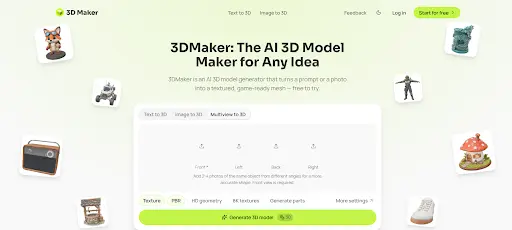
3DMaker is a browser-based generator with two main entry points: text-to-3D and image-to-3D. Its public interface also presents controls for texture, PBR materials, geometry quality, 8K textures, and part generation. The site states that models can be exported as GLB files with physically based rendering materials. 3DMaker’s product page also lists compatibility targets such as Blender, Unity, Unreal Engine, Three.js, Babylon.js, and model-viewer.
The product does not ask users to begin with a complex modeling workspace. Instead, the opening move is a prompt or an image.
That makes the interface feel closer to a creative test bench than a conventional 3D application. The workflow is short: provide direction, generate, inspect, and export.
The text route is useful when the object exists only in words. A prompt can include form, materials, mood, proportion, and use case.
For example, “a compact retro-futurist camping lantern, brushed aluminum body, amber glass, rounded edges” provides more guidance than “lantern.” The difference is not subtle. Specific visual constraints give the model a stronger target.
Still, a prompt is not an engineering drawing. Exact measurements, internal mechanisms, and strict manufacturing tolerances should not be assumed from a descriptive sentence alone.
The image-to-3D route makes more sense when there is already a product photo, sketch, or reference object. The platform says it can work from one image or up to four angles, which is significant because a single front-facing image leaves the back and side geometry open to interpretation. Its current feature page notes that extra angles can provide more detail.
This is where expectations need to stay grounded. An AI system can infer hidden surfaces, but inference is not the same as direct observation.
For simple objects with a clear outline, one good image may be enough for a useful concept. For asymmetrical items, transparent materials, or objects with moving parts, multiple views and later manual review are more important.
The platform’s process is easy to understand even for a first-time visitor. That is one of its more practical strengths.
Start by choosing text or image input. With text, describe the object’s subject, material, shape, style, and intended use.
With images, choose a clean reference with an uncluttered background where possible. A sharp object boundary gives the generator less visual noise to interpret.
A useful rule is to write prompts like a visual brief, not a search query. “Wooden stool” is broad; “low walnut stool with three tapered legs, soft studio lighting, Scandinavian design” is a direction.
3DMaker lists four mesh-density levels, ranging from Fast to Ultra. Its site estimates typical generation time at roughly 10 to 120 seconds, although actual results can depend on the selected settings and current service conditions. The official overview frames Fast as a quicker draft option and Ultra as the higher-detail setting.
For early concepts, speed has a real advantage. It is often smarter to compare several rough directions before investing time in one detailed output.
For close-up rendering or downstream refinement, a denser model may be the more sensible choice. The trade-off is familiar: more detail can improve visual fidelity, but it does not remove the need to inspect topology or proportions.
The generated result opens in an interactive preview. This is the moment where an AI 3D Maker stops being a novelty and becomes part of a workflow.
Rotate the object. Check the silhouette. Look at the underside and rear surfaces. Ask whether the important visual story survived.
For a character, inspect limbs and facial balance. For a product concept, look for warped edges, unexpected seams, or materials that do not match the intended object. For a game prop, decide whether the shape reads clearly at the distance where players will actually see it.
The available GLB export is convenient because it can carry a model and its materials together. That reduces a common early-stage hurdle: moving an asset into a renderer or real-time environment without manually reconnecting every texture.
However, exporting is not the same as approving. I would still open the file in the target tool and check scale, normals, geometry, material response, and performance needs.
The biggest advantage is speed to first visual. Instead of beginning with an empty viewport, users can begin with an object that is already visible and editable.
This is particularly useful for teams where the person with the idea is not the person who knows Blender or CAD. A writer, marketer, indie developer, or product manager can communicate a rough form before involving a dedicated 3D artist.
Another strength is the dual-input design. Text is flexible when an idea is new, while image input is practical when a flat reference already exists.
The PBR-oriented workflow and GLB export also point toward real downstream use. They do not guarantee production readiness, but they make the handoff less awkward than a static concept image.
AI-generated geometry can surprise you. That is part of the appeal, but it is also a limitation when the project requires exact control.
The system may interpret vague wording in unexpected ways. A single reference image may also lead to guessed surfaces that do not match the real object.
For production assets, users should plan for review and possible editing. Retopology, UV checks, scale adjustment, rigging, print-wall thickness, and engine optimization may still be necessary.
Pricing and credit consumption also deserve a close look before a high-volume workflow. The interface indicates that generations use credits, so frequent experimentation has a cost dimension beyond the time spent generating.
3DMaker seems most relevant to creators who need a fast visual bridge between an idea and a more developed 3D process. Indie game teams can use it for prop exploration. Product teams can use it to discuss form earlier. Educators and students can use it to make abstract ideas tangible.
It may also help web creators who need a GLB starting point for interactive product pages or lightweight 3D scenes. The key is to treat the output as a useful asset candidate, not a finished object by default.
Experienced 3D artists may find value in it for rapid blocking and reference exploration. They are also the users most likely to know when the generated model needs manual correction.
The value of an AI 3D Maker is not that it eliminates craft. Its value is that it lowers the cost of the first experiment.
Traditional 3D workflows reward skill and patience, and those still matter. But many ideas never reach a 3D artist because the initial request is too vague or too small to justify a full modeling task.
Tools such as 3DMaker create a middle stage. They let teams test shape, mood, material, and direction before committing to deeper production work.
That can improve conversations, not just output volume. A rough 3D model gives collaborators something concrete to disagree with, refine, or discard.
3DMaker is best understood as a fast concept-generation tool with a clear path into broader 3D workflows. Its text and image inputs make it accessible, while its GLB export and material-oriented output make it more practical than a flat image generator.
It will not remove the need for quality control, especially in technical, commercial, or high-detail work. But for early ideation, visual communication, and rapid asset exploration, it offers a credible way to turn a vague prompt or reference image into a model worth examining.