AI Blogs
    • Top AI Tools, News & Reviews in 2026
    Added on 21 August

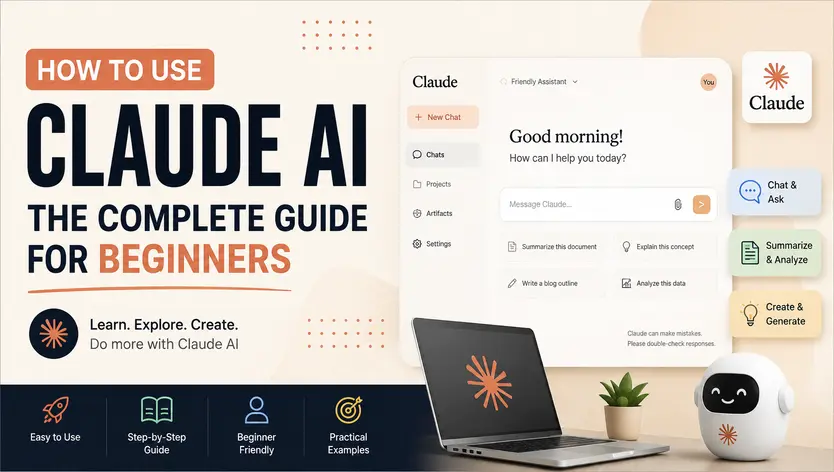
    How to Use Claude AI: The Complete Guide for Beginners

    21 August

    For years, ChatGPT sat unchallenged as the default assistant for the AI-driven professional. However, a quiet but decisive migration is happening among elite AI users. Driven by massive updates in cross-chat memory, autonomous directory agents, and terminal integrations, professionals are migrating their day-to-day workflows.


    Rather than treating Claude as a simple chatbot, power users are adopting it as an intelligent co-worker—a digital team member capable of managing projects, coding complete software applications, and executing deep research in the background.


    This comprehensive, authoritative guide provides a clear blueprint for mastering Claude’s modern ecosystem. Grounded directly in real-world professional workflows and Anthropic’s official guidelines, we detail how to structure your prompts, organize your workspace, select the right pricing tiers, and leverage cutting-edge terminal and folder automation.


    1. Decoding the Claude Model Matrix & Subscription Tiers

    Understanding the differences between Anthropic’s primary models and subscription tiers is essential for maximizing your return on investment. Claude’s architecture is divided into three distinct model classes, each tailored for different computational weights and speeds:
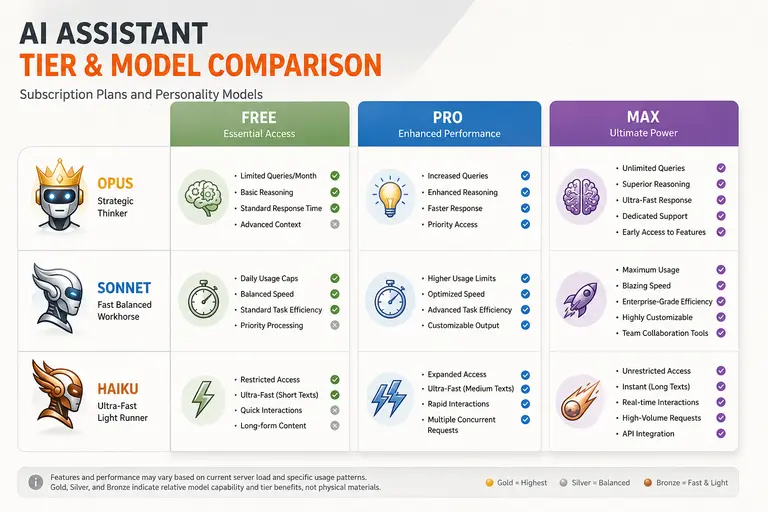

    • Claude Opus (including Opus 4.6): The crown jewel of the ecosystem. Opus is the most capable, advanced model, acting as a deep strategic thinker. It excels in complex logic, contextual synthesis, document analysis, and high-level strategy.


    • Claude Sonnet (including Sonnet 4.6): The primary workhorse. Sonnet is incredibly fast, highly cost-efficient, and matches or even beats Opus in several key performance benchmarks. It is the default option for standard chats, quick coding, and general writing tasks.


    • Claude Haiku: The fastest and lightest model, designed for rapid-fire responses, lightweight API calling, and low-latency workflows.


    Figure 1: Claude Subscription Tiers and Model Matrix Comparison Matrix


    Choosing the Right Tier for Your Workflow depends entirely on how deeply you integrate AI into your daily operations:


    • The Free Tier: This tier provides access to the robust Claude Sonnet model. It is highly useful for basic chatting, coding help, document reviews, and image analysis. However, it is restricted by soft daily usage caps that can be quickly reached with continuous, heavy usage.


    • The Pro Tier ($20/month): The entry point for serious AI users. It grants five times (5x) the usage of the free tier and full access to all models, including the strategic powerhouse Opus. Furthermore, Pro unlocks crucial workspace tools, including Projects (smart folders), Google Workspace connectors, extended reasoning features, deep research capabilities, and access to Claude Code.


    • The Max Tier: Positioned for extreme power users, developers, and teams who 'live in Claude all day'. It increases limits to five times (5x) the Pro plan's limits (and up to 20x for advanced developer profiles), provides a significantly larger context window, and is designed to handle heavy Claude Code sessions, agentic web scraping, and hours of continuous deep research without rate limiting.


    • Team and Enterprise Tiers: Anthropics’ enterprise tiers are built for business-wide integrations (such as their recent public integrations with companies like Goldman Sachs).Additionally, Anthropic’s 'Co-work for small businesses' has made advanced, shared collaboration tools accessible to small organizations without requiring full enterprise agreements.


    Pro Tip: If you are on the Pro plan and frequently hit rate limits, divide your tasks strategically. Use the lightning-fast Sonnet model for routine brainstorming, administrative copywriting, and casual chatting. Switch to the strategic Opus model only when you require advanced coding, multi-source document analysis, or complex logical problem-solving.


    2. The Anthropic-Vetted Master Prompt Framework

    Many users fail to get high-quality answers from Claude because they write brief, unstructured prompts. Large Language Models (LLMs) are highly sensitive to context. To get expert-level outputs, your inputs must be structured with deliberate precision.


    The following six-step prompt framework is vetted by Anthropic's own engineering teams to extract the absolute highest-fidelity responses from Claude:
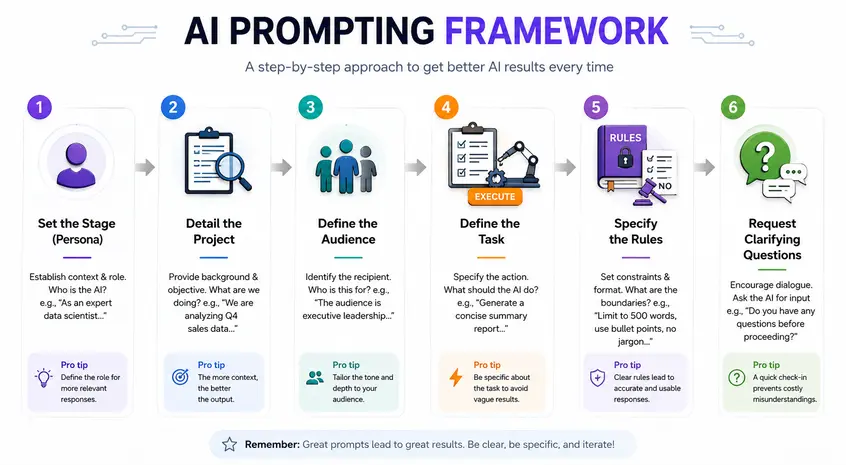

    1. Set the Stage (Establish Persona): Define exactly who Claude is acting as. For example: 'You are an elite B2B freelance copywriter...' or 'You are a seasoned startup founder...'
    2. Detail the Project: Define what you are actively building. For example: 'We are drafting an investor pitch deck for our seed round...' or 'We are writing an in-depth SEO pillar article...'
    3. Define the Target Audience: Be highly specific about who the final asset is for. For example: 'Our audience consists of institutional venture capitalists who value hard data over marketing hype...'
    4. Define the Concrete Task: State exactly what you need Claude to do. Make instructions highly actionable.
    5. Specify the Rules (Constraints): Establish strict guardrails for the formatting and tone. Tell Claude to be concise, use bullet points, or adopt a formal editorial voice to prevent generic AI fluff.
    6. The Clarifying Question Hook (Crucial): Explicitly instruct Claude to ask you questions to clarify the situation before generating the final answer.


    Figure 2: The Master Prompt Six-Step Structural Blueprint


    The Clarifying Questions Hack: Instead of forcing Claude to guess the missing variables of a business scenario, include this phrase at the bottom of every strategic prompt: 'Ask me any clarifying questions you need to understand my specific business context better before you provide your final recommendation.' This simple prompt structure forces Claude to interview you first. You can respond by typing or using voice dictation. The resulting strategy or asset will be highly customized to your actual business reality, rather than a generic template.


    3. Harnessing Claude’s Advanced Feature Ecosystem

    The true power of Claude lies beyond the standard chat window. Anthropic has built a connected suite of workspace tools that transform Claude from a simple conversation partner into a collaborative work environment.
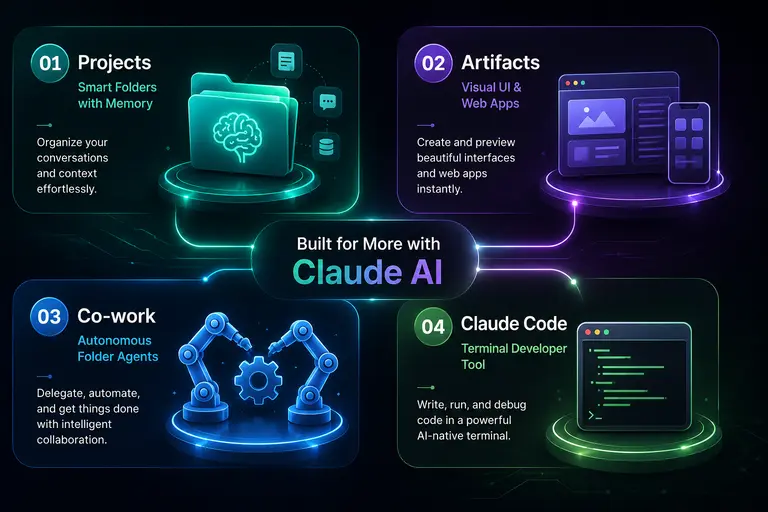

    Figure 3: The Claude Advanced Feature Ecosystem


    A. Projects: Smart Folders with Extended Memory


    Think of Projects as smart, interactive folders. Instead of starting a new chat every time and losing context, you can organize your work into dedicated Projects (e.g., Strategic Business, Content Operations, Crypto Research, and Personal Lifestyle).


    • The One-Page MVP Hack: Create a one-page 'Minimum Viable Product' document summarizing who you are, your business, your pain points, and your strategic objectives. Upload this file directly to your Project’s core files. Every chat started within that project folder will automatically read this context. You will never have to repeat your company background, target market, or brand voice again.


    • Cross-Chat Memory Upgrades: Claude’s upgraded memory engine allows it to read and store context across a multitude of distinct chats within a project. If you establish a strategic brainstorming session in one chat, Claude can reference those conclusions when you open a separate daily operations chat inside the same Project folder.]


    B. Artifacts: Instant Web Applications & Dashboards


    Artifacts are interactive, visual representations of code and data that pop up in a dedicated side-panel next to your chat window. Instead of just giving you raw code block output, Claude can write the code and compile it in real-time, allowing you to instantly export it as a functional web application or dashboard.


    • No-Code Application Development: You can prompt Claude to build custom habit trackers, interactive calendars, landing pages, landing funnels, or financial models on the fly.


    • The 10-Second Financial Dashboard: Simply provide Claude with raw data and ask it to represent the information visually. For example, a user can input a fictional $100,000 investment portfolio and ask for a visual dashboard. Within ten seconds, Claude will render an interactive, fully styled application displaying monthly income, net worth changes over time, savings rates, and holdings breakdowns.


    C. Claude Co-work: Your Autonomous Folder Agent


    While standard AI chatbots require you to upload files one by one, Claude Co-work acts as an autonomous agent operating within a designated local folder on your computer.


    • How Co-work Operates: You point Co-work to a local directory on your device. You can then give it a broad, complex instruction—such as 'Analyze these 20 company financial PDFs, build a combined profit-and-loss spreadsheet, and calculate our key investment ratios'.


    • Background Execution: Co-work will work autonomously in the background, reading, organizing, and editing files directly inside your local folder while you work on other tasks.


    • The Security Advantage: Unlike Open-source agents (like OpenClaude) which request broad, risky access to your entire desktop, Co-work is sandboxed to a single, specific folder. This localized control makes it highly secure and practical for sensitive corporate workflows.


    D. Claude Code & API Connectors


    For developers and technical teams, Claude Code connects directly to your local terminal. This allows the AI to write, test, debug, and push code directly within your terminal workspace. For non-technical professionals, Claude’s native Connectors link directly to Google Workspace (Gmail, Google Drive, and Google Calendar). Once connected, Claude can pull files, parse your calendar schedule, and draft email responses automatically without requiring you to manually copy and paste data.


    4. Practical Recommendations for Daily AI Integration

    1. Differentiate Your Workspace Projects: Set up a clean folder structure. For example, keep your strategic executive planning entirely separate from your day-to-day operations chats. This keeps your context clean and prevents Claude’s memory from mixing unrelated data.
    2. Build Custom Skills with '/' Commands: You can train Claude to execute highly repetitive, customized tasks using the `/` command. For example, tell Claude: 'I want to create a skill for my daily brief where I provide raw notes and you output my top 5 tasks and 3 things to avoid'. Once set up, you can simply type `/dailybrief` and paste your notes to run the automation instantly.
    3. Optimize Desktop vs. Mobile Usage: Use the Claude Mac or Windows desktop application for heavy, multi-project workflows, co-working, and dashboard building. However, utilize the Claude mobile app when you are on the go to take advantage of its native voice transcription features, allowing you to easily dictate complex brainstorms and business scenarios.


    5. Strategic Extensions: Advanced Claude Workflows (Beyond the Video)

    The following advanced strategies represent modern, industry-level frameworks designed to extend the core principles of Mars Deutsche's Claude tutorial into enterprise-level execution.


    A. Constructing an Enterprise-Grade Custom System Prompt


    While simple instructions work for standard tasks, corporate integrations require custom system-level prompts to lock Claude into strict operational modes. A production-ready system prompt must enforce three pillars:


    1. Strict XML Tag Output: Force Claude to think before answering by requiring a <thinking> tag for chain-of-thought analysis, followed by an <output> tag. This significantly reduces hallucinations in complex workflows.
    2. Strict Negative Constraints: Explicitly outline forbidden phrases, brand vocabulary, and formatting styles to maintain a consistent corporate voice.
    3. Dynamic Context Windows: Define when the system should flush short-term chat history to conserve token usage in high-volume API implementations.


    B. Git-Integrated Development via Claude Code


    For engineering teams, Claude Code represents a massive shift in automated development. By integrating directly with local terminal environments and Git:


    • Automated Pull Request Reviews: You can set up terminal hooks where Claude automatically scans your Git diffs, analyzes the changes against your project files, and drafts a markdown summary of potential bugs or style violations before you merge.
    • Test-Driven Refactoring: Instruct Claude to run your local test suite, parse the error logs, fix the broken code files in your directory, and re-run the tests until the entire suite passes.


    C. Security & Data Governance in Shared Workspaces


    As small businesses adopt shared co-working tools, implementing strict data governance is critical:



    • Data Opt-Out Settings: Ensure that your team's conversations and uploaded project files are excluded from Anthropic's model-training cycles by enabling data privacy configurations in your organization settings.
    • API-First Local Deployments: For highly sensitive customer data (such as healthcare or legal records), bypass the standard web application. Deploy Claude's models locally via Amazon Bedrock or Google Cloud Vertex AI to ensure absolute data sovereignty.

    Frequently Asked Questions
    Q1: What makes Claude better than ChatGPT for professional writing and coding?
    While ChatGPT is a strong general strategist and logical thinker, Claude is widely favored for creative and professional writing because its responses are architected to sound significantly more natural and human. For coding, models like Claude 3.5 Sonnet and Opus demonstrate superior syntax understanding, and features like Artifacts and Claude Code provide an unmatched environment for building, running, and visualizing applications in real-time.
    Q2: How does the new memory upgrade work in Claude Projects?
    Previously, LLM conversations were isolated; starting a new chat meant losing all previous context. With the latest memory upgrade, Claude can read across distinct chats within a single Project folder. It dynamically tracks and stores data over time, allowing your Strategic Brainstorming chats to naturally inform your Daily Operations chats without requiring you to copy-paste context.
    Q3: What is the difference between Claude Co-work and Claude Code?
    Claude Co-work is a high-level autonomous agent designed to manage, organize, and edit standard files (like spreadsheets, text documents, or PDFs) within a specific local folder on your computer. Claude Code, on the other hand, is a developer-specific terminal utility that operates directly in your command line, allowing you to write, debug, and compile production-level software.
    Q4: Can I use Claude connectors to automate my business calendar and emails?
    Yes. By navigating to the customized settings and enabling Connectors, you can securely link Claude directly to your Google Workspace (Gmail, Google Calendar, and Google Drive). This allows Claude to automatically view, pull, and draft materials based on your real-time emails and calendar schedules.
    Q5: If I am on a budget, is the $20 Pro plan really necessary?
    While the Free tier is incredibly capable, the $20 Pro plan is a game-changer for professional productivity. It grants you 5x the usage limits, full access to the strategic Opus model, and unlocks the entire advanced workspace suite, including Projects, Google connectors, Claude Code, and deep research agents. For anyone utilizing AI for professional or business workflows, the Pro plan offers massive, immediate value.

    Other Listings

    Area Manager - Indore (M.P.)
    Fashion Accessories
    Fine Leather Goods
    Web developer
    Travel & Tour Operators
    loader
    View More