Creating a GoHighLevel account takes under ten minutes. The sign-up process is straightforward, the platform is accessible immediately after registration, and no technical knowledge is required to get started.
This guide covers every step from the initial sign-up to the first actions you should take inside the dashboard after your account is created.
To start the GoHighLevel sign-up process, head over to the registration page via a certified affiliate link, and the extended 30-day trial period will be applied automatically.
Signing up through the main GoHighLevel website at gohighlevel.com only activates the standard 14-day trial. The extended trial is available exclusively through affiliate partner links, so using the link from ghlcrm.me is the only way to access the full 30 days.
The registration form asks for four pieces of information: your full name, company name, email address, and phone number.
Use your actual business email address. It becomes your login username on the platform and appears in client-facing communications, automated emails, and system notifications sent under your account. Entering a personal email you rarely check creates friction every time you need to log in or receive platform alerts.
Fill in the company name accurately as it appears in client-facing areas, including the login portal and email templates.
If you are setting up a white-label account, you can update the branding to match your agency identity in the settings after the account is created, but starting with accurate information will save you corrections later.
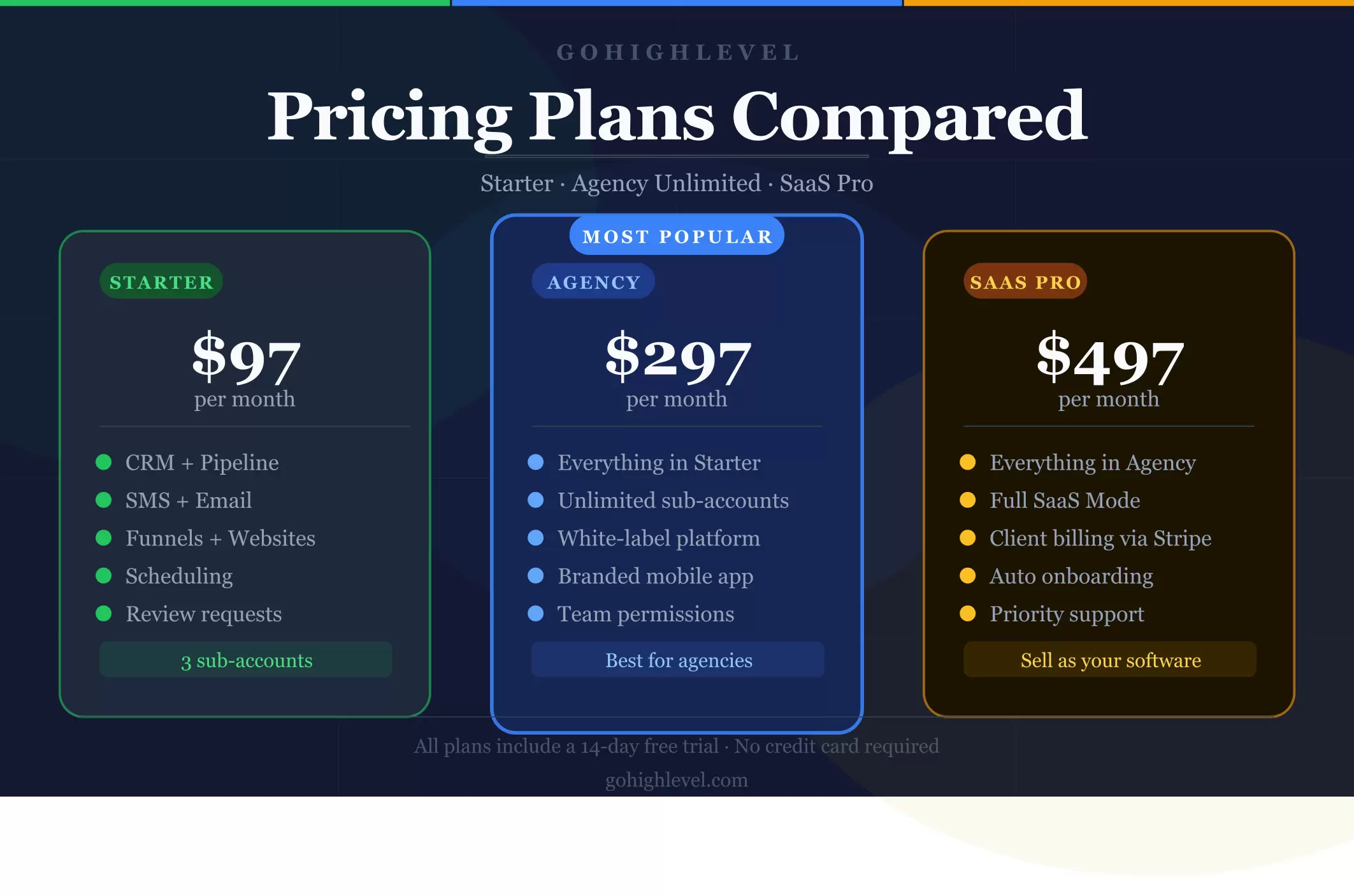
The registration process requires you to select a pricing plan before completing sign-up. Three options are available.
The Starter plan at $97 per month is the right choice for solo consultants, freelancers, and local businesses managing their own marketing with no more than three client accounts. It gives you full access to the core GoHighLevel feature set, including CRM, automation, funnels, scheduling, reputation management, and the AI Employee. White-label capabilities are not available at this tier.
The Agency Unlimited plan at $297 per month is the right choice for marketing agencies managing campaigns for multiple clients. It adds unlimited sub-accounts, full white-label capabilities, including a custom domain and a branded desktop app, white-label SaaS reselling with manual billing, team permission controls, and basic API access, on top of everything in the Starter plan.
The Agency Pro plan at $497 per month is the right choice for agencies ready to build an automated SaaS revenue model. It adds SaaS Mode with automated client onboarding, Stripe billing integration, tiered subscription packaging, a white-label mobile app, advanced snapshots, advanced API access, and priority support on top of everything in the Agency Unlimited plan.
GoHighLevel requires a valid credit or debit card from a major bank to activate the trial. Prepaid cards are not accepted. Your card is not charged during the 30-day trial period. The first payment is taken only after the trial ends.
If you decide not to continue, cancel before the trial expires and no charge is made.
Entering your payment details is a standard part of the sign-up process for most SaaS platforms offering free trials.
The requirement exists to ensure a seamless transition to paid access for users who continue after the trial, not to charge you immediately.
Set a strong password for the account. GoHighLevel stores contact data, client sub-accounts, automation configurations, pipeline data, and payment records inside the platform. A strong password protects everything inside it.
Use a combination of uppercase letters, numbers, and symbols that you will not need to reset regularly.
Click the sign-up button to finish creating the account. At this stage, you may see an optional offer for done-for-you setup services. This is an additional paid service and is not required to configure the platform.
Skip it if you want to set up the account yourself, which the steps below cover in full.
After completing registration you land directly on your GoHighLevel agency dashboard.
Full platform access is available immediately. There is no waiting period, no approval process, and no limited access mode during the trial.
The sign-up process creates the account. What you do in the first session after that determines how quickly the platform becomes useful. Here are the first actions to take inside the dashboard.
The LaunchPad appears as soon as you log in for the first time. It is a guided onboarding sequence with short video tutorials covering the essential setup steps. Work through each relevant section before doing anything else.
The LaunchPad gives you a structured starting point and tracks your progress as each step is completed.
Go to Settings then Company Settings. Enter your agency name, business address, contact email, phone number, website, and timezone in the Basic Details tab. This information appears in client-facing areas including login portals and automated email templates.
If you are on the Agency Unlimited or SaaS Pro plan, go to the Whitelabel tab and upload your agency logo and configure your custom domain. Clients accessing the platform through your custom domain see your branded interface rather than the GoHighLevel default. This is the foundational step for the white-label setup.
Navigate to Settings then Payments and connect your Stripe account or preferred payment processor. This is required for collecting client payments, processing booking deposits, and running subscription billing through SaaS Mode on the Pro plan.
Go to Settings then Email Services and connect an SMTP provider such as Mailgun or SendGrid. Configuring a dedicated sending domain significantly improves email deliverability compared to the default sending infrastructure.
Follow the instructions to verify your domain through SPF, DKIM, and DMARC records in your DNS settings.
If you plan to use SMS, calls, voicemail drops, or Voice AI, go to Settings then Phone Numbers and purchase a dedicated number through the LC Phone System built into GoHighLevel. This number handles all voice and text communications within the platform.
From the Agency View dashboard click Sub-Accounts then Add Sub-Account. Select a Snapshot template for the relevant industry or start with a blank account. Enter the client's business information and click Create Sub-Account.
The sub-account is immediately ready for customization with the client's specific funnels, automations, and campaign requirements.
Creating a GoHighLevel account is the straightforward part. What determines whether the platform delivers results is what gets built inside it during the first few weeks of the trial.
Use the extended 30-day free trial available through ghlcrm.me, work through the setup steps in the correct order, and by the end of the first week, the account will be properly configured and ready to run real campaigns.