
Drafting with AI is no longer the interesting part of anyone’s workflow. Almost everyone does it now, quietly, as a first step. The part that still takes real skill is what happens after: turning a serviceable AI draft into something that actually sounds like you wrote it. That gap, between “technically fine” and “sounds like a person,” is what people mean when they talk about humanizing AI text.
This is a practical guide, not a theory piece. We’ll look at why AI writing has a specific, recognizable texture in the first place, walk through what HumanizeAIText.io actually does with that texture, and go through the habits that separate a genuinely good humanizing pass from a lazy one.
A quick example before the mechanics: “Many businesses today are increasingly utilizing artificial intelligence to optimize their operational efficiency” versus “More businesses are leaning on AI to run leaner.” Same claim, roughly. One reads like a policy memo. Guess which one a person actually finishes reading.
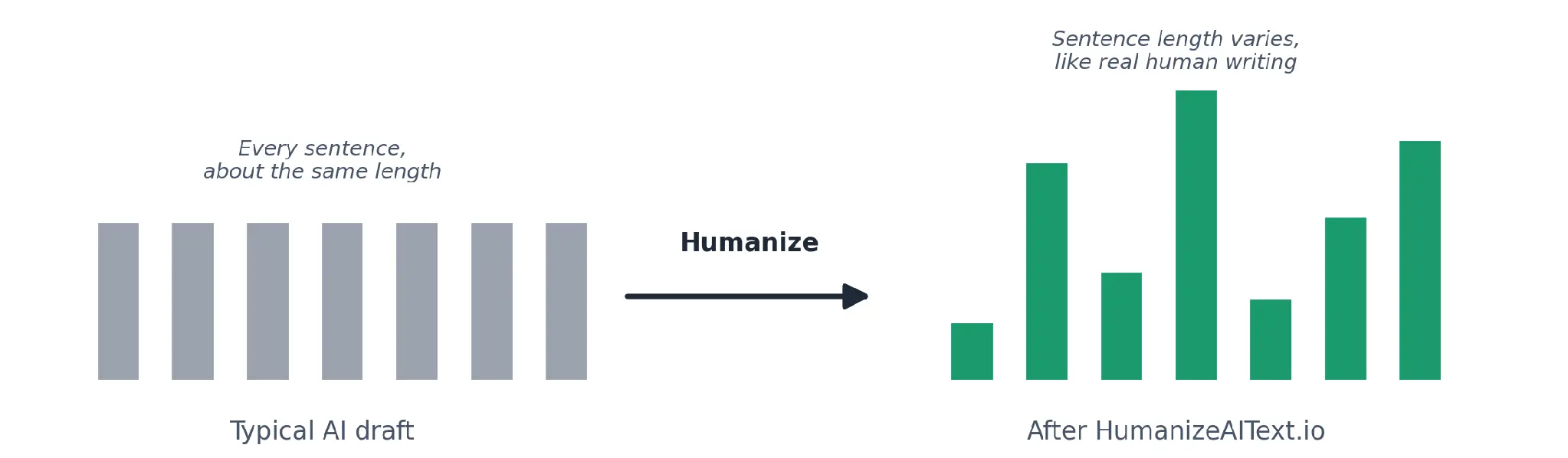
Every large language model does the same basic thing at every step: it predicts the single most likely next word. That’s efficient, and it’s why AI drafts read cleanly. It’s also why they can feel strangely flat. This creates two properties which are described by researchers – perplexity and burstiness. The level of predictability of the words chosen, and the variation in length and rhythm in sentences, from line to line, is called perplexity and burstiness, respectively.
However, human writing is more careless with both of those features: a six-word sentence alternates with a twenty-five-word sentence, and a bizarre word is grabbed out of nowhere, and a plain one is dispensed elsewhere. Left to its own devices,
AI text tends to remain on a very low and very safe portion in both measures. If they had a name, readers would have a clue regarding what detectors have picked up. Once a paragraph begins with each sentence being 12-16 words, then it seems to be receding as the reader reads through it, even when each sentence's information is accurate.
That’s genuinely useful to know, but it’s worth holding loosely. The same research explaining why detectors flag uniform, predictable text also shows the method misfires constantly, flagging historical documents that happen to be memorized word-for-word by training data and, more seriously, flagging real human writing that happens to be formal, plain, or careful. The pattern is real. The score built on top of it is not gospel.
HumanizeAIText.io is built around one job: take a block of AI-written text and rewrite the parts that give it away, without changing what it actually says. You paste in a draft from ChatGPT, Claude, Gemini, or anything else, and it comes back with more natural sentence rhythm, less predictable phrasing, and the same facts and structure you started with. It’s free, doesn’t require an account, and doesn’t cap how many times you use it in a day. It handles up to 1,000 words per request, so longer pieces get processed in a few passes rather than one.
There are six output modes to match different contexts: Standard, Fluent, Academic, Formal, Casual, and Concise, plus support for more than 40 languages if you’re writing outside English. It also includes a separate AI detector, so you can check a draft before deciding whether it needs a rewrite at all. Per its privacy page, nothing you paste is stored or shared; it’s deleted once the rewrite finishes. By its own comparison page, most competing tools cap free usage at a few hundred words a day or hold their better output behind a paywall; HumanizeAIText.io does neither, which is worth knowing if you’re used to hitting a wall halfway through a project. Going by the tool’s own use-case pages, the people actually using it skew toward students, bloggers and content writers, marketers, and non-native English speakers cleaning up drafts before they go out the door.
The actual process is short enough that it barely needs explaining, which is sort of the point.
Paste your text: a paragraph, a full blog draft, an email, whatever you’re working on. Humanize it, or check it first: if you’re not sure a section needs work, run it through the detector before committing to a rewrite.
Copy it and go: it isn't an ultimate read whenever you have finished composing a text; rather, it is for you to look over a last time before you finally read the piece to your teacher or other people.
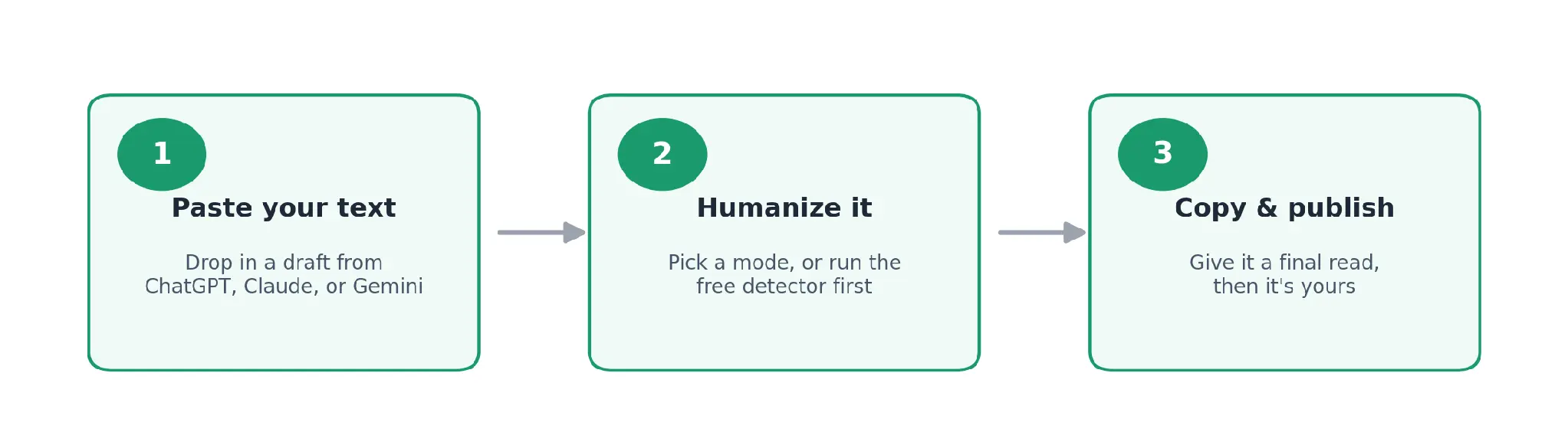
Paste the text and click the humanizer button. Get output that actually flows with the content. There are a couple of habits that can make you get output that actually looks great, and is easily viewable with another glance.
Match the mode to the room you’re writing for. Standard and Fluent read differently from Academic or Formal, and Casual reads differently from all four. A LinkedIn post humanized in Academic mode will still sound a little stiff, and a research summary humanized in Casual mode will sound like it’s trying too hard. Pick the mode for the room the writing is actually walking into, not the default.
Run the detector before you run the humanizer. Not every sentence in an AI draft needs work. Some sections already have your voice in them, especially if the prompt had specific examples or opinions baked in. Check first, fix what’s actually flat, and leave the rest alone. It’s faster, and it keeps you from over-processing a paragraph that was fine to begin with.
Work section by section, not word-count by word-count. With a 1,000-word ceiling per pass, it’s tempting to chop a longer piece into even blocks. Don’t. Break it at natural seams, an intro, a section, a conclusion, so each pass has full context for what that chunk is actually trying to say. A rewrite that only sees half a thought tends to smooth over details it shouldn’t.
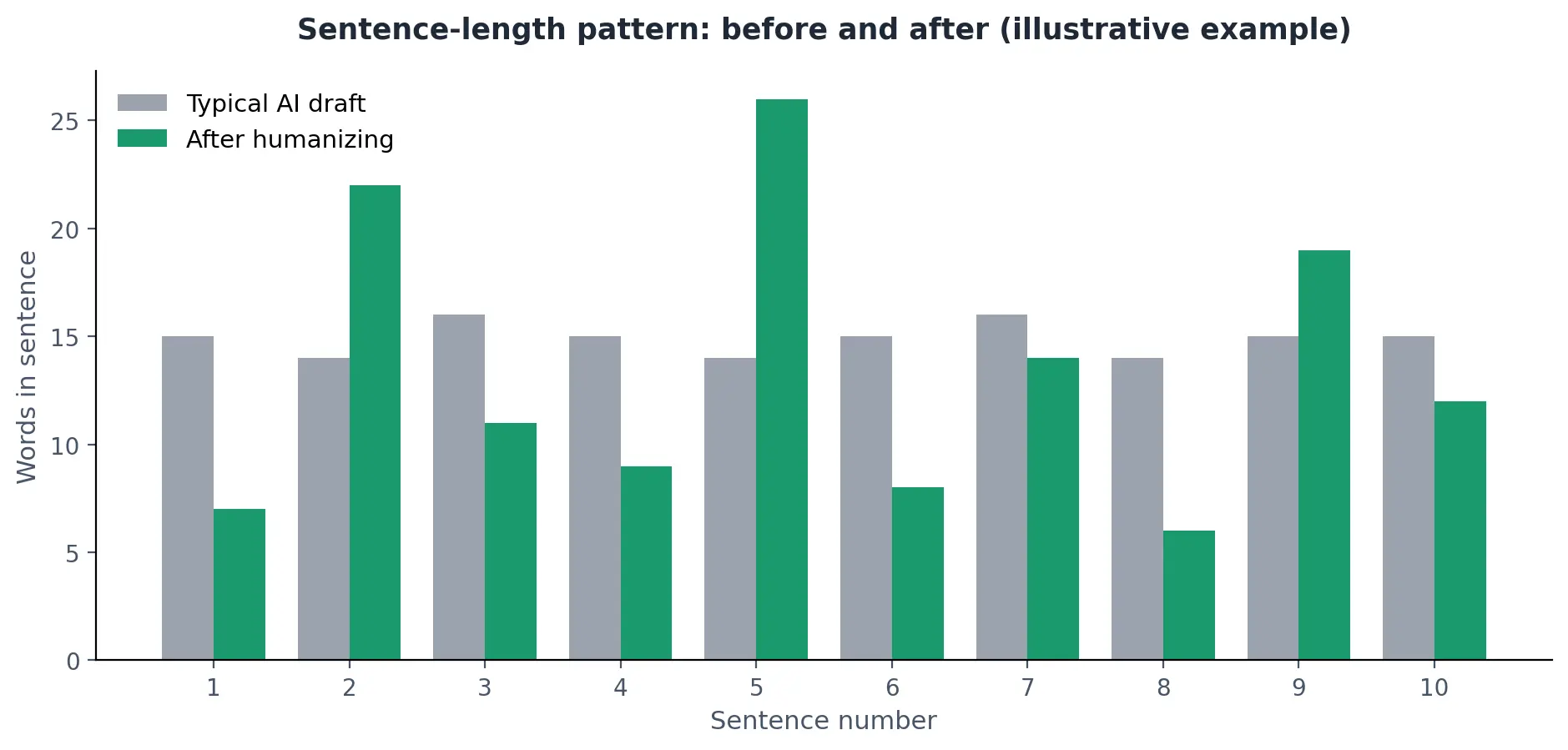
The pattern a humanizing pass is actually correcting for.
Vary the rhythm yourself, too. A humanizer changes the pattern of what’s already there; it can’t invent a sharper opening line or decide which point deserves a short, blunt sentence instead of a fully developed one. That’s still a writing decision, and it’s one of the oldest pieces of advice in the craft. Purdue’s Online Writing Lab has a solid breakdown of the actual mechanics: joining short sentences, varying how a sentence opens, mixing clause structures, and it applies just as well to a humanized draft as it does to a first one.
Guard your keywords if you’re writing for search. A rewrite tool preserving “meaning” and preserving your exact target phrase aren’t always the same thing. If a specific term, product name, or keyword needs to survive intact, do a quick find-and-check on the output before you publish. It takes thirty seconds and saves you from discovering later that your primary keyword quietly became a synonym.
Set the output language. For languages other than English, such as Spanish, Arabic, Tamil, or more than 40 other supported languages, you should write the text in that language, as no translation should take the place of direct writing. That's a lot more important than it sounds: Stanford researchers found that AI detectors misfire on non-native English writing more than 60% of the time, largely because careful second-language writing already carries the lower-variance patterns detectors are trained to flag.
Treat any AI score as a hint, not a verdict. Whether it’s HumanizeAIText.io’s own detector or someone else’s, a low or high AI-likelihood score is a signal worth looking at, not proof of anything. Detectors get fooled by memorized text, by very formal writing, and by writers who simply happen to write in a plain, direct style. Do not treat the score as a strict guideline on “safe” or “unsafe” – use it as the basis for deciding on where to invest your editing time.
Read it aloud before publishing. This will outlast AI, and it still works. Read the humanized version out loud, or have your phone read it to you. Anywhere you stumble, or anywhere you’d never actually say something that way in conversation, is worth a second look. It catches things a rewrite tool can’t, because it’s testing sound, not pattern.
Humanizing a draft is a style pass, not a fact-check. It fixes how something reads, not whether it’s accurate, so the verification step is still on you, especially for anything with numbers, claims, or specifics attached. It’s also worth remembering that no humanizer, this one included, can manufacture a personal example you didn’t have or an opinion you haven’t formed. It can only work with what’s already on the page. And while HumanizeAIText.io states that it doesn’t store or share what you paste in, it’s still sensible to keep genuinely sensitive material, client data, medical details, and legal specifics out of any online tool as a general rule, this one included.
None of this makes humanizing AI text some kind of trick. But it’s closer to what a good editor has long done: read something that has a technical shoot to it, see where it is flattish, smooth the rhythm, and do as if a real person wrote it. HumanizeAIText.io handles the mechanical part of that in seconds. The habits above are what make the result worth publishing.